> ## Documentation Index
> Fetch the complete documentation index at: https://docs.shokunin.app/llms.txt
> Use this file to discover all available pages before exploring further.
# Local Dev Environment
> What's running where after setup, and how each component connects
# Local Dev Environment
After completing the [Getting Started](/getting-started) guide, this is what your development environment looks like. Use this page to understand what each component is, where it runs, and how it connects to everything else.
***
## Architecture at a Glance
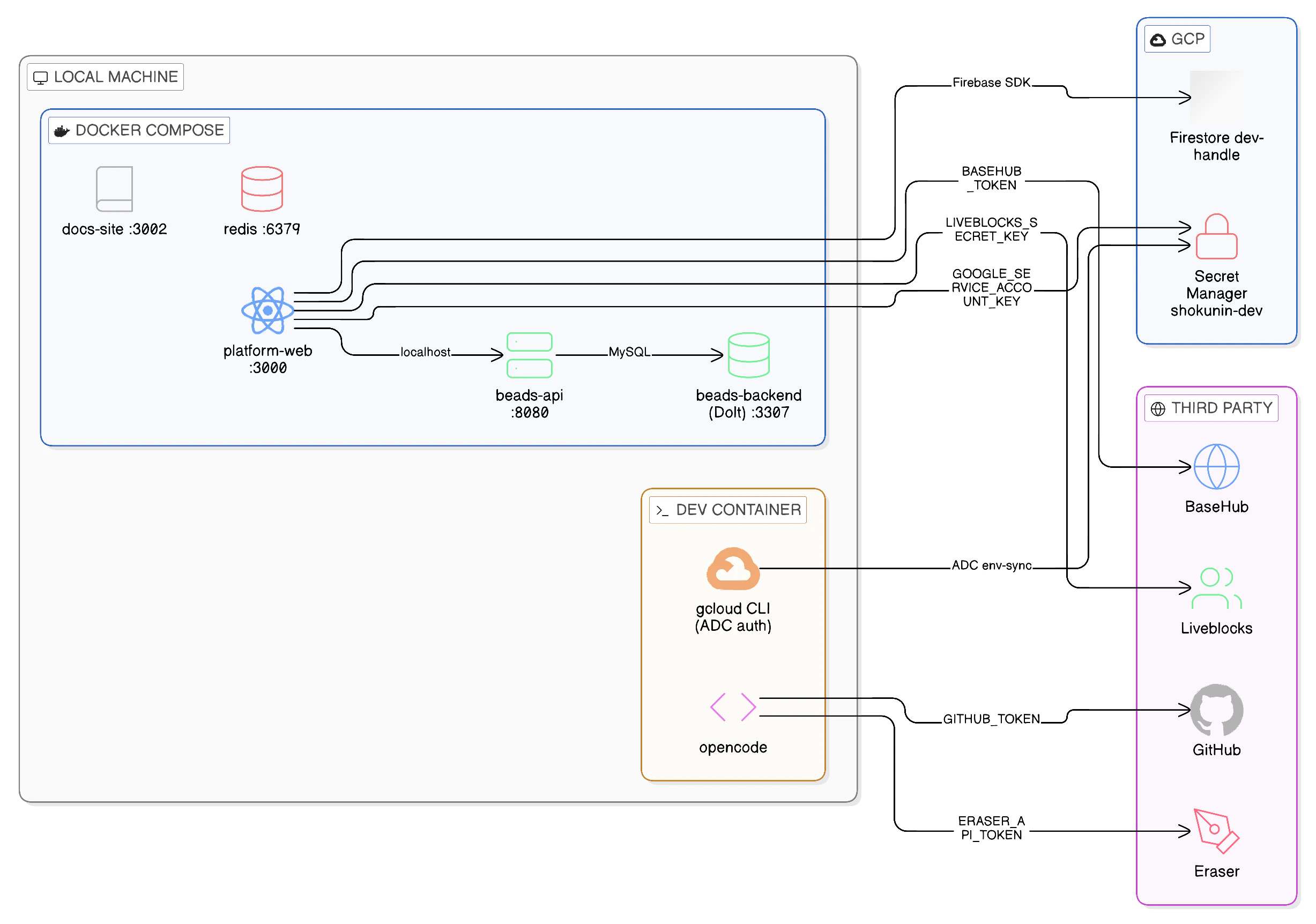 Everything in your environment spans three zones: your **local machine** (Docker Compose services), **GCP** (shared cloud infrastructure), and **third-party services** (SaaS APIs). The dev container is the hub — it holds your authenticated `gcloud` session and is the trust anchor that connects all three.
***
## Component Map
### Local — Docker Compose
These services run on your machine via `docker-compose up -d`. No cloud required to start them.
| Service | Port | What it is | Key dependency |
| --------------- | ------ | ------------------------------------------ | ---------------------------------------- |
| `platform-web` | `3000` | Next.js app (hot reload via `bun run dev`) | Firebase, BaseHub, Liveblocks, Beads API |
| `docs-site` | `3002` | Mintlify docs site (this site) | None |
| `beads-api` | `8080` | Beads task-tracking HTTP API | `beads-backend` |
| `beads-backend` | `3307` | Dolt SQL Server (local task data) | Volume `beads-data` |
| `redis` | `6379` | Redis cache | None |
`beads-backend` is a **local replica** using a Dolt SQL Server running in Docker Compose. Team data for staging and production lives in dedicated GCP Dolt VMs — not accessible from local dev.
### GCP — Shared Dev Infrastructure
These resources live in GCP project `shokunin-480309` and are shared across the team. Your dev container connects to them via your authenticated `gcloud` session.
| Resource | GCP Service | How you connect | Auth |
| ----------------------------------- | -------------- | ------------------------- | ------------------------------------- |
| Firestore database (`dev-`) | Firestore | Firebase SDK | `NEXT_PUBLIC_FIREBASE_*` |
| Secret Manager (`shokunin-dev-*`) | Secret Manager | `gcloud` CLI / `env-sync` | Application Default Credentials (ADC) |
The dev-shared GCP environment does not run a Dolt VM or Beads API Cloud Run service — those exist in staging and production only. Local dev uses Docker Compose services (`beads-api` and `beads-backend`) exclusively.
Your personal Firestore database (`dev-`) was created by `./scripts/dev-setup` when you applied your sandbox terraform. It is isolated from other developers' databases.
### Third-Party Integrations
These are SaaS APIs consumed by the platform. Tokens are stored in GCP Secret Manager and pulled into your `.env` by `./scripts/env-sync`.
| Service | Used by | What for | Secret |
| -------------- | -------------- | ---------------------------------------------- | ----------------------- |
| **BaseHub** | `platform-web` | CMS content (documentation snippets, copy) | `BASEHUB_TOKEN` |
| **Liveblocks** | `platform-web` | Real-time multiplayer / presence in the canvas | `LIVEBLOCKS_SECRET_KEY` |
| **GitHub** | `opencode` | Code access, PR creation, issue management | `GITHUB_TOKEN` |
| **Eraser** | `opencode` | Diagram generation via MCP | `ERASER_API_TOKEN` |
***
## Connection Map
How the platform reaches each external system:
```mermaid theme={null}
flowchart LR
web["platform-web\nlocalhost:3000"]
beads["beads-api\nlocalhost:8080"]
dolt["beads-backend\nlocalhost:3307"]
oc["opencode"]
subgraph GCP
SM["Secret Manager"]
FS["Firestore\ndev-<handle>"]
end
subgraph "3rd Party"
BH["BaseHub"]
LB["Liveblocks"]
GH["GitHub"]
ER["Eraser"]
end
web -->|FIREBASE_*| FS
web -->|BASEHUB_TOKEN| BH
web -->|LIVEBLOCKS_SECRET_KEY| LB
web -->|localhost| beads
beads --> dolt
oc -->|GITHUB_TOKEN| GH
oc -->|ERASER_API_TOKEN| ER
oc -->|gcloud ADC| SM
```
***
## Secrets Reference
All secrets are populated into your `.env` by `./scripts/env-sync`. This table shows where each one comes from and what uses it.
| Variable | Source | Consumer | Notes |
| -------------------------------- | ------------------------------------------------------ | ------------------------------------ | -------------------------------------- |
| `NEXT_PUBLIC_FIREBASE_API_KEY` | Secret Manager `shokunin-dev-firebase-browser-api-key` | `platform-web` (browser) | Public — safe to expose |
| `NEXT_PUBLIC_FIREBASE_*` (other) | `.env.example` (pre-filled) | `platform-web` (browser) | Non-secret config values |
| `LIVEBLOCKS_SECRET_KEY` | Secret Manager `shokunin-dev-liveblocks-secret-key` | `platform-web` (server) | Server-side only |
| `BASEHUB_TOKEN` | Secret Manager `shokunin-dev-basehub-token` | `platform-web` (server) | Server-side only |
| `ERASER_API_TOKEN` | Secret Manager `shokunin-dev-eraser-api-token` | `opencode` MCP | Team-shared token |
| `GITHUB_TOKEN` | Set manually (GitHub PAT) | `opencode`, GitHub CLI | Personal token — not in Secret Manager |
| `GOOGLE_SERVICE_ACCOUNT_KEY` | Secret Manager `shokunin-dev-vercel-caller-sa-key` | `platform-web` server-side GCP calls | Single-line JSON SA key |
| `CGO_ENABLED=1` | `.env.example` | `bd` CLI | Required for native Go bindings |
***
## Identity & Access Summary
Who is authenticating as what when you work locally:
| Action | Your identity | How |
| ---------------------------------------------------------- | ----------------------------------------- | -------------------------------------------------------------- |
| Running `gcloud` commands | Your GCP user account | `gcloud auth login` |
| Reading secrets (`env-sync`) | Your GCP user account | Application Default Credentials (ADC) |
| Running `./scripts/tf dev ` | `shokunin-dev-platform-sa` (impersonated) | `gcloud auth print-access-token --impersonate-service-account` |
| Firebase auth (app login) | End-user (browser session) | Firebase Authentication SDK |
| Calling GCP APIs from the app (infra status, provisioning) | `shokunin-dev-vercel-caller-sa` | JSON key in `GOOGLE_SERVICE_ACCOUNT_KEY` |
Your personal GCP user account has two roles on the project, both granted by your sandbox terraform (`./scripts/dev-setup`):
* `roles/secretmanager.secretAccessor` — read secret values
* `roles/secretmanager.viewer` — list secrets (required for `env-sync` to enumerate)
The `serviceAccountTokenCreator` binding (needed to impersonate the platform SA for terraform) is granted separately via foundation, before your sandbox is created.
***
## Environment Variables Reference
For a complete list of all variables and their defaults, see `.env.example` in the repo root. To re-populate your `.env` at any time:
```bash theme={null}
./scripts/env-sync # safe to re-run; skips variables already set
```
To force-update a specific variable that was already set, delete its line from `.env` and re-run.
Everything in your environment spans three zones: your **local machine** (Docker Compose services), **GCP** (shared cloud infrastructure), and **third-party services** (SaaS APIs). The dev container is the hub — it holds your authenticated `gcloud` session and is the trust anchor that connects all three.
***
## Component Map
### Local — Docker Compose
These services run on your machine via `docker-compose up -d`. No cloud required to start them.
| Service | Port | What it is | Key dependency |
| --------------- | ------ | ------------------------------------------ | ---------------------------------------- |
| `platform-web` | `3000` | Next.js app (hot reload via `bun run dev`) | Firebase, BaseHub, Liveblocks, Beads API |
| `docs-site` | `3002` | Mintlify docs site (this site) | None |
| `beads-api` | `8080` | Beads task-tracking HTTP API | `beads-backend` |
| `beads-backend` | `3307` | Dolt SQL Server (local task data) | Volume `beads-data` |
| `redis` | `6379` | Redis cache | None |
`beads-backend` is a **local replica** using a Dolt SQL Server running in Docker Compose. Team data for staging and production lives in dedicated GCP Dolt VMs — not accessible from local dev.
### GCP — Shared Dev Infrastructure
These resources live in GCP project `shokunin-480309` and are shared across the team. Your dev container connects to them via your authenticated `gcloud` session.
| Resource | GCP Service | How you connect | Auth |
| ----------------------------------- | -------------- | ------------------------- | ------------------------------------- |
| Firestore database (`dev-`) | Firestore | Firebase SDK | `NEXT_PUBLIC_FIREBASE_*` |
| Secret Manager (`shokunin-dev-*`) | Secret Manager | `gcloud` CLI / `env-sync` | Application Default Credentials (ADC) |
The dev-shared GCP environment does not run a Dolt VM or Beads API Cloud Run service — those exist in staging and production only. Local dev uses Docker Compose services (`beads-api` and `beads-backend`) exclusively.
Your personal Firestore database (`dev-`) was created by `./scripts/dev-setup` when you applied your sandbox terraform. It is isolated from other developers' databases.
### Third-Party Integrations
These are SaaS APIs consumed by the platform. Tokens are stored in GCP Secret Manager and pulled into your `.env` by `./scripts/env-sync`.
| Service | Used by | What for | Secret |
| -------------- | -------------- | ---------------------------------------------- | ----------------------- |
| **BaseHub** | `platform-web` | CMS content (documentation snippets, copy) | `BASEHUB_TOKEN` |
| **Liveblocks** | `platform-web` | Real-time multiplayer / presence in the canvas | `LIVEBLOCKS_SECRET_KEY` |
| **GitHub** | `opencode` | Code access, PR creation, issue management | `GITHUB_TOKEN` |
| **Eraser** | `opencode` | Diagram generation via MCP | `ERASER_API_TOKEN` |
***
## Connection Map
How the platform reaches each external system:
```mermaid theme={null}
flowchart LR
web["platform-web\nlocalhost:3000"]
beads["beads-api\nlocalhost:8080"]
dolt["beads-backend\nlocalhost:3307"]
oc["opencode"]
subgraph GCP
SM["Secret Manager"]
FS["Firestore\ndev-<handle>"]
end
subgraph "3rd Party"
BH["BaseHub"]
LB["Liveblocks"]
GH["GitHub"]
ER["Eraser"]
end
web -->|FIREBASE_*| FS
web -->|BASEHUB_TOKEN| BH
web -->|LIVEBLOCKS_SECRET_KEY| LB
web -->|localhost| beads
beads --> dolt
oc -->|GITHUB_TOKEN| GH
oc -->|ERASER_API_TOKEN| ER
oc -->|gcloud ADC| SM
```
***
## Secrets Reference
All secrets are populated into your `.env` by `./scripts/env-sync`. This table shows where each one comes from and what uses it.
| Variable | Source | Consumer | Notes |
| -------------------------------- | ------------------------------------------------------ | ------------------------------------ | -------------------------------------- |
| `NEXT_PUBLIC_FIREBASE_API_KEY` | Secret Manager `shokunin-dev-firebase-browser-api-key` | `platform-web` (browser) | Public — safe to expose |
| `NEXT_PUBLIC_FIREBASE_*` (other) | `.env.example` (pre-filled) | `platform-web` (browser) | Non-secret config values |
| `LIVEBLOCKS_SECRET_KEY` | Secret Manager `shokunin-dev-liveblocks-secret-key` | `platform-web` (server) | Server-side only |
| `BASEHUB_TOKEN` | Secret Manager `shokunin-dev-basehub-token` | `platform-web` (server) | Server-side only |
| `ERASER_API_TOKEN` | Secret Manager `shokunin-dev-eraser-api-token` | `opencode` MCP | Team-shared token |
| `GITHUB_TOKEN` | Set manually (GitHub PAT) | `opencode`, GitHub CLI | Personal token — not in Secret Manager |
| `GOOGLE_SERVICE_ACCOUNT_KEY` | Secret Manager `shokunin-dev-vercel-caller-sa-key` | `platform-web` server-side GCP calls | Single-line JSON SA key |
| `CGO_ENABLED=1` | `.env.example` | `bd` CLI | Required for native Go bindings |
***
## Identity & Access Summary
Who is authenticating as what when you work locally:
| Action | Your identity | How |
| ---------------------------------------------------------- | ----------------------------------------- | -------------------------------------------------------------- |
| Running `gcloud` commands | Your GCP user account | `gcloud auth login` |
| Reading secrets (`env-sync`) | Your GCP user account | Application Default Credentials (ADC) |
| Running `./scripts/tf dev ` | `shokunin-dev-platform-sa` (impersonated) | `gcloud auth print-access-token --impersonate-service-account` |
| Firebase auth (app login) | End-user (browser session) | Firebase Authentication SDK |
| Calling GCP APIs from the app (infra status, provisioning) | `shokunin-dev-vercel-caller-sa` | JSON key in `GOOGLE_SERVICE_ACCOUNT_KEY` |
Your personal GCP user account has two roles on the project, both granted by your sandbox terraform (`./scripts/dev-setup`):
* `roles/secretmanager.secretAccessor` — read secret values
* `roles/secretmanager.viewer` — list secrets (required for `env-sync` to enumerate)
The `serviceAccountTokenCreator` binding (needed to impersonate the platform SA for terraform) is granted separately via foundation, before your sandbox is created.
***
## Environment Variables Reference
For a complete list of all variables and their defaults, see `.env.example` in the repo root. To re-populate your `.env` at any time:
```bash theme={null}
./scripts/env-sync # safe to re-run; skips variables already set
```
To force-update a specific variable that was already set, delete its line from `.env` and re-run.