

Architecture Overview
The Shokunin Platform is a Next.js 15 monorepo backed by Firebase/Firestore and Google Cloud Platform. It is built around a hierarchy of four core concepts: projects → workshops → agents → workflows. This page explains what those concepts are, how they relate, and which parts of the system exist today versus what is planned.Core Concepts
Project
A project is the top-level organizational unit. Every team starts by creating a project, which scopes all work: workshops, agents, task tracking (Beads), and infrastructure configuration. Status: Implemented- Firestore collection:
tenants/{tenantId}/projects/{projectId} - Managed by
domains/dashboard/(project list, creation, member management) DashboardProjectentity carries workshop count, agent count, Beads connection settings, and member list- UI:
/projectslist and/projects/[projectId]detail routes
infrastructure/beads-api or direct host config). This allows a project to track its own issue graph.
Workshop
A workshop is a managed workspace within a project where AI agents collaborate on tasks. Think of it as a room in which a team of AI agents work together, with shared context, a workflow canvas, and a knowledge base. Status: Implemented (schema, repositories, UI routes)- Firestore collection:
tenants/{tenantId}/projects/{projectId}/workshops/{workshopId} - Managed by
domains/workshop/(repositories, hooks, types) - Core entities:
Workshop,Agent,WorkflowNode,WorkflowEdge - UI:
/workshops,/workshops/[workshopId]/overview,/workshops/[workshopId]/agents,/workshops/[workshopId]/workflow,/workshops/[workshopId]/agent-control,/workshops/[workshopId]/settings - Domain hooks:
useWorkshop,useAgents,useWorkflow(indomains/workshop/hooks/)
Agent Control Panel
The Agent Control Panel (/workshops/[workshopId]/agent-control) is a client-side UI that orchestrates workshop container provisioning and live session monitoring:
- Provisioning:
POST /api/workshops/[workshopId]/provision— idempotency-safe; writesstatus=queuedto Firestore and enqueues a Cloud Tasks job for the Shokunin Provisioner. Returns 200 (no-op) when already queued/running, 202 when newly queued. - Live session status: streams SSE events from the workshop container via
AgentRuntimeProvider(domains/agent-runtime/) - Health indicator: polls the shokunin-agent
/statusendpoint viaContainerHealthIndicator - Deep links: per-session links to OpenCode web UI
agentUrl field on the Workshop Firestore document is set at first provisioning and is used by the control panel for all outbound connections to the workshop container.
Workshops have a lifecycle: created within a project, configured with agents, and executed by running workflows. A workshop belongs to exactly one project.
Agent
An agent is an AI participant in a workshop. Agents have specializations (e.g., Architect, Developer, DBA, QA), a model assignment, a system prompt, and a status (idle | working | error | active | disabled).
Status: Implemented (schema, repository, agent management UI)
- Firestore collection:
.../workshops/{workshopId}/agents/{agentId} - Repository:
domains/workshop/repositories/agent-repository.ts - Agents are created through the workshop’s agent management UI
- Specializations: Architect, Developer, DBA, DevOps, QA, Security, Tech Lead, Product Owner
- Plan limits enforced in UI (disabled button + upgrade banner when at limit)
Shokunin Agent (Autonomous Service)
The Shokunin Agent (infrastructure/shokunin-agent) is an autonomous TypeScript service that runs inside a Workshop Container alongside OpenCode. It manages the full agent lifecycle: polling Beads for ready tasks, creating isolated git worktrees per task, spawning OpenCode sessions, and persisting state to Firestore.
- Replaces the
agent-loop.shbash script - Built on Fastify with structured logging (pino), listening on port 8090
- Talks to OpenCode (port 4096, same pod) via
@opencode-ai/sdk - Listens for
session.idle/session.errorSSE events fromclient.global.event()as completion signals - Exposes a control REST API (
POST /loop/start,POST /loop/stop,GET /status) authenticated viaX-Agent-Key - Proxies
/opencode/*requests to OpenCode including SSE streaming (piped without buffering) - Can be scoped to a specific Beads epic (
epicId) to work on a subset of tasks - Persists runtime state (
AgentRuntimeState,SessionMapping) to Firestore atagents/{agentId}/runtime/state - Externally reachable via a shared GKE Gateway at
agent.<tenant>.<domain>
tasks/prd-shokunin-agent-service.md for the full PRD.
Forge Agent
A Forge Agent is an agent specialized in code review and merge operations — designed to validate and integrate agent-produced changes into the main branch via a dedicated workflow. Forge agents operate on git worktrees produced by other sessions. Status: Planned — Referenced in Shokunin Agent Service PRD as future integration point.Workflow
A workflow is a directed graph of steps that agents execute inside a workshop. Workflows are built visually using a React Flow canvas and persisted in Firestore. Status: Implemented (schema, repositories, canvas UI)- Firestore collections:
.../workflowNodes/{nodeId}and.../workflowEdges/{edgeId} - Repositories:
domains/workshop/repositories/workflow-node-repository.ts,workflow-edge-repository.ts - Node types (from
packages/shokunin-flow):StartNode,StepNode,ConditionNode,LoopNode,ParallelNode,EndNode - Edge types:
FlowEdge,ConditionalEdge,LoopbackEdge - Each
StepNodecan have an assigned agent from the workshop’s agent pool - Mock data: SDLC workflow (Plan → Design → Implement → Review → Test → Deploy) seeded on creation
System Architecture
The diagram below shows the full system: the platform UI running in the browser backed by Firebase, and the planned Workshop Container where autonomous agents execute tasks using OpenCode and Beads.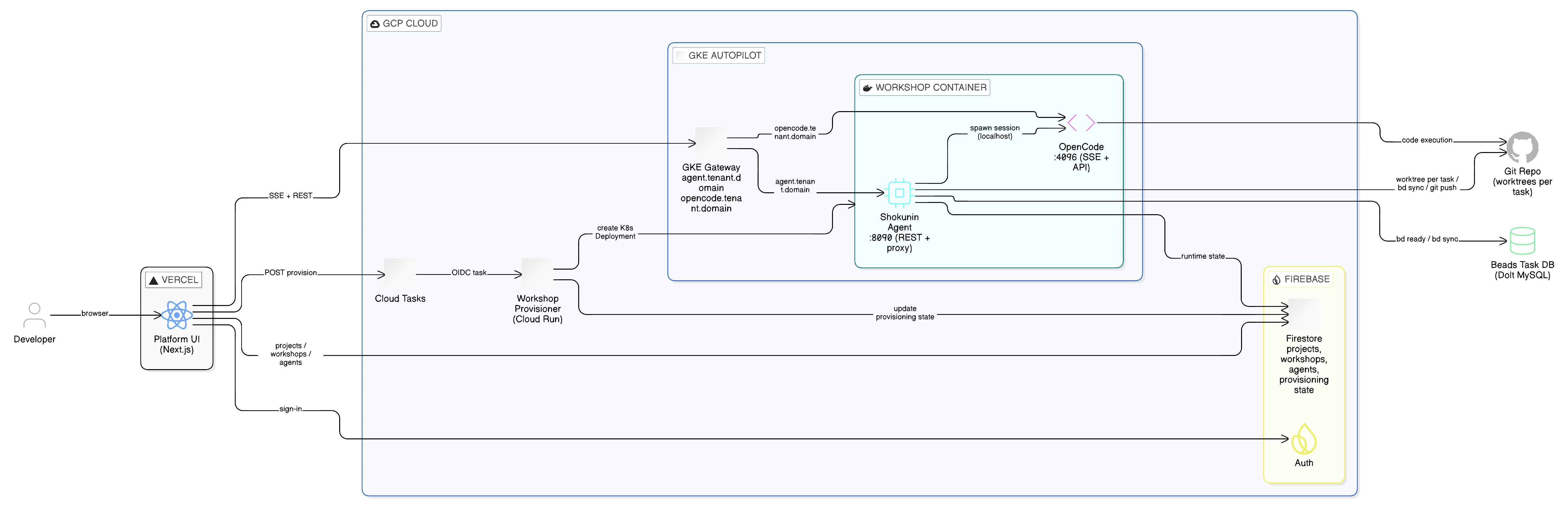
Domain Model
The platform organizes Firestore data into four domain modules:Firestore Collection Hierarchy
schemaVersion, createdAt, updatedAt, tenantId) and support on-read lazy migrations via a shared migrations framework.
Agent Runtime domain
domains/agent-runtime/ provides a provider-agnostic interface for consuming agent events in the browser:
AgentRuntimeProviderinterface (types.ts) — factory-based, not class-based; structural compatibility over inheritancecreateOpenCodeProvider(providers/opencode-provider.ts) — connects to<agentBaseUrl>/opencode/eventSSE stream, reconnects automatically on disconnect- Pure utilities:
event-parser.ts(parses raw SSE strings into typedSessionEventobjects),health-mapper.ts(mapStatusResponseToHealthmaps HTTP health check responses toHealthState) - Used by:
ContainerHealthIndicator,AgentControlPanel
Infrastructure Status domain
domains/infrastructure/ provides GCP infrastructure status data to the Admin Infrastructure Dashboard:
GcpStatusRepositoryinterface +createHttpGcpStatusRepository()HTTP implementation (calls/api/infrastructure/status)useInfrastructureStatus(env)hook — fetches and auto-refreshes every 60 seconds; manages loading/error stateenvironment-resolver.ts— pure function that resolvesEnvironmentContextfromprocess.env(readsNEXT_PUBLIC_FIREBASE_DATABASE_ID)manifest-parser.ts— pure stateless functions for queryingGcpInfraManifestdeclarations
Package Architecture
Internal packages underpackages/ provide shared primitives:
Infrastructure
Data Flow: From Task to Code
End-to-end flow for autonomous task execution via the Shokunin Agent Service.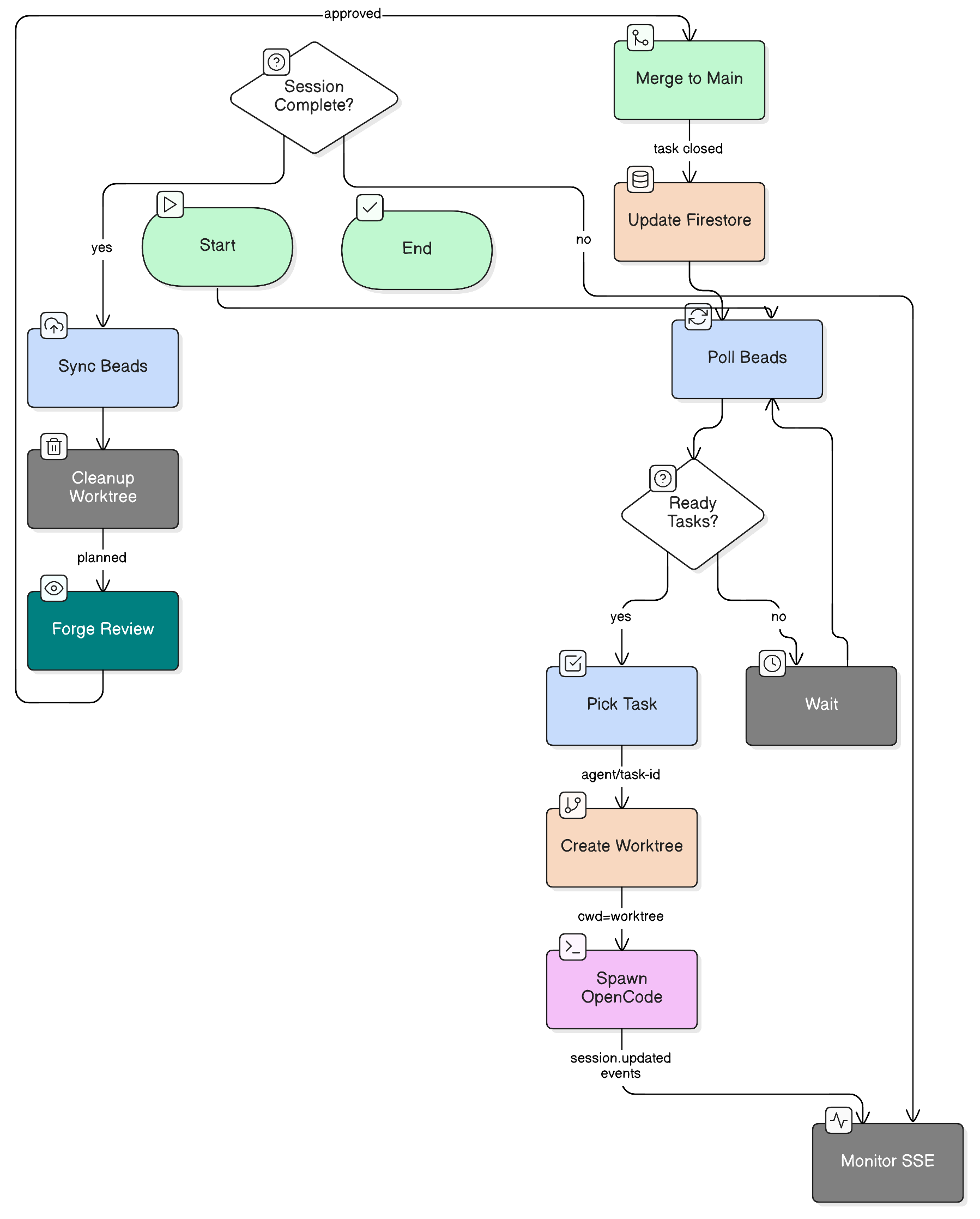
External routing (Vercel → Workshop)
agentEndpoint stored in Firestore for each workshop is the external Gateway URL (e.g., https://agent.acme-corp.example.com) — not an in-cluster address.
Task execution flow
- User creates a project, workshop, configures agents and a workflow in the platform UI.
- Beads tracks the task graph for the project.
- Shokunin Agent (
POST /loop/start) polls Beads for ready tasks (bd ready). - For each ready task, the agent creates an isolated git worktree (
<repo>/.worktrees/task-<id>, branchagent/task-<id>). - The agent spawns an OpenCode session scoped to that worktree directory via
client.session.create({ query: { directory } }). - OpenCode works autonomously; the agent listens for
session.idle/session.errorSSE events onclient.global.event(). - On
session.idle(completion): the agent runsbd sync, cleans up the worktree, and updates Firestore state. - On
session.error(failure): the agent cleans up the worktree and records the error in Firestore. - A Forge Agent (planned) reviews the produced branch and merges it.
- The platform UI reflects the updated task status in real time via Firestore.
The agent listens for
session.idle (not session.updated) as the completion signal. session.updated carries only metadata changes and must not be used as a terminal event.Key Design Decisions
Repository Pattern
Data access is encapsulated in repository classes underdomains/<domain>/repositories/. Business logic never touches Firestore directly.
Domain Hooks
Custom React hooks (useWorkshop, useAgents, useWorkflow) consume repositories and expose reactive state. Context (tenantId, projectId) is injected explicitly, not read from global state.
Server vs Client Components
Server Components are used by default.'use client' is added only when interactivity (state, events) is strictly required.