Local Dev Environment
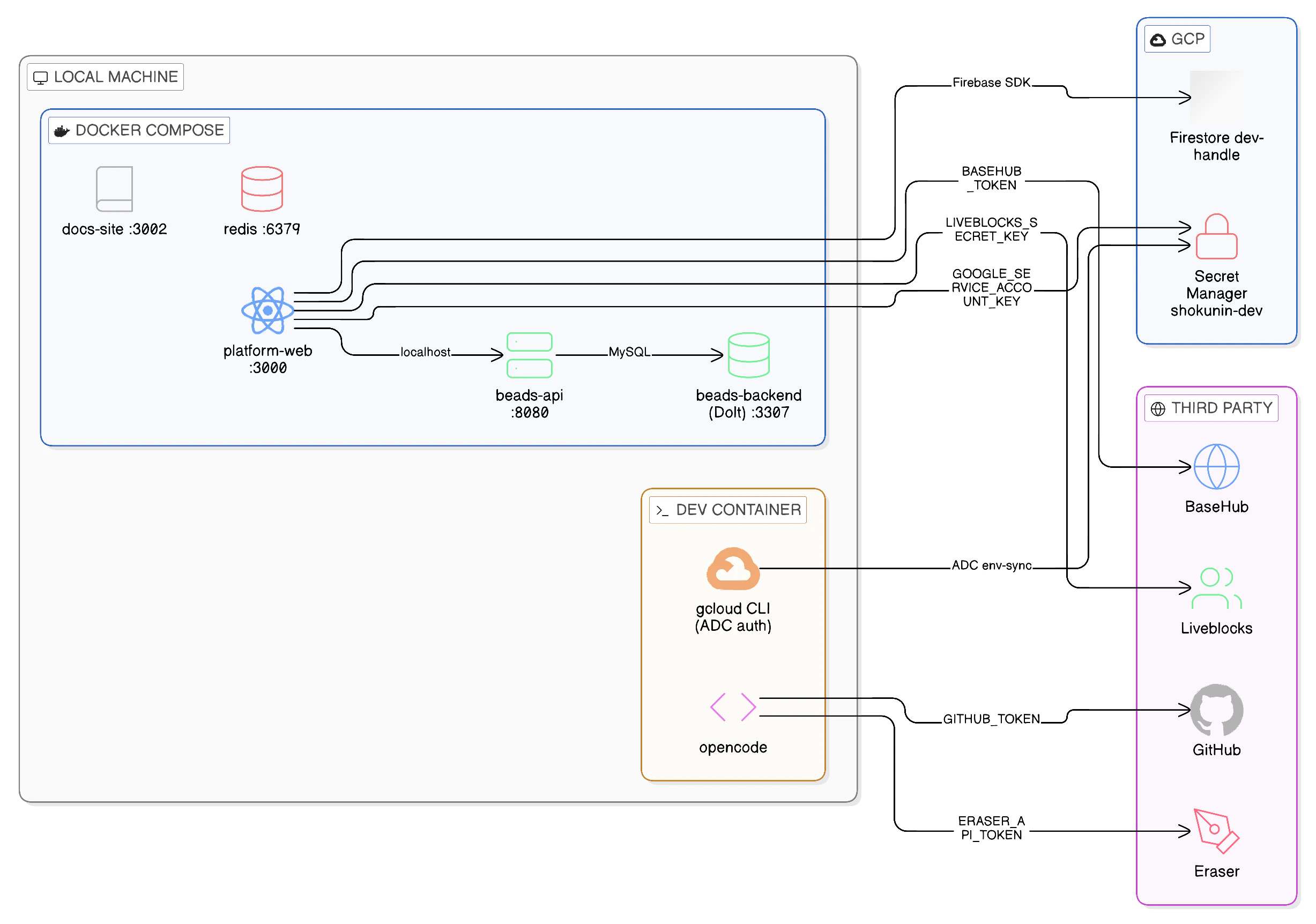
After completing the Getting Started guide, this is what your development environment looks like. Use this page to understand what each component is, where it runs, and how it connects to everything else.
Architecture at a Glance
Everything in your environment spans three zones: your local machine (Docker Compose services), GCP (shared cloud infrastructure), and third-party services (SaaS APIs). The dev container is the hub — it holds your authenticated gcloud session and is the trust anchor that connects all three.
Component Map
Local — Docker Compose
These services run on your machine via docker-compose up -d. No cloud required to start them.
| Service | Port | What it is | Key dependency |
|---|
platform-web | 3000 | Next.js app (hot reload via bun run dev) | Firebase, BaseHub, Liveblocks, Beads API |
docs-site | 3002 | Mintlify docs site (this site) | None |
beads-api | 8080 | Beads task-tracking HTTP API | beads-backend |
beads-backend | 3307 | Dolt SQL Server (local task data) | Volume beads-data |
redis | 6379 | Redis cache | None |
beads-backend is a local replica using a Dolt SQL Server running in Docker Compose. Team data for staging and production lives in dedicated GCP Dolt VMs — not accessible from local dev.
GCP — Shared Dev Infrastructure
These resources live in GCP project shokunin-480309 and are shared across the team. Your dev container connects to them via your authenticated gcloud session.
| Resource | GCP Service | How you connect | Auth |
|---|
Firestore database (dev-<handle>) | Firestore | Firebase SDK | NEXT_PUBLIC_FIREBASE_* |
Secret Manager (shokunin-dev-*) | Secret Manager | gcloud CLI / env-sync | Application Default Credentials (ADC) |
The dev-shared GCP environment does not run a Dolt VM or Beads API Cloud Run service — those exist in staging and production only. Local dev uses Docker Compose services (beads-api and beads-backend) exclusively.
Your personal Firestore database (dev-<handle>) was created by ./scripts/dev-setup when you applied your sandbox terraform. It is isolated from other developers’ databases.
Third-Party Integrations
These are SaaS APIs consumed by the platform. Tokens are stored in GCP Secret Manager and pulled into your .env by ./scripts/env-sync.
| Service | Used by | What for | Secret |
|---|
| BaseHub | platform-web | CMS content (documentation snippets, copy) | BASEHUB_TOKEN |
| Liveblocks | platform-web | Real-time multiplayer / presence in the canvas | LIVEBLOCKS_SECRET_KEY |
| GitHub | opencode | Code access, PR creation, issue management | GITHUB_TOKEN |
| Eraser | opencode | Diagram generation via MCP | ERASER_API_TOKEN |
Connection Map
How the platform reaches each external system:
Secrets Reference
All secrets are populated into your .env by ./scripts/env-sync. This table shows where each one comes from and what uses it.
| Variable | Source | Consumer | Notes |
|---|
NEXT_PUBLIC_FIREBASE_API_KEY | Secret Manager shokunin-dev-firebase-browser-api-key | platform-web (browser) | Public — safe to expose |
NEXT_PUBLIC_FIREBASE_* (other) | .env.example (pre-filled) | platform-web (browser) | Non-secret config values |
LIVEBLOCKS_SECRET_KEY | Secret Manager shokunin-dev-liveblocks-secret-key | platform-web (server) | Server-side only |
BASEHUB_TOKEN | Secret Manager shokunin-dev-basehub-token | platform-web (server) | Server-side only |
ERASER_API_TOKEN | Secret Manager shokunin-dev-eraser-api-token | opencode MCP | Team-shared token |
GITHUB_TOKEN | Set manually (GitHub PAT) | opencode, GitHub CLI | Personal token — not in Secret Manager |
GOOGLE_SERVICE_ACCOUNT_KEY | Secret Manager shokunin-dev-vercel-caller-sa-key | platform-web server-side GCP calls | Single-line JSON SA key |
CGO_ENABLED=1 | .env.example | bd CLI | Required for native Go bindings |
Identity & Access Summary
Who is authenticating as what when you work locally:
| Action | Your identity | How |
|---|
Running gcloud commands | Your GCP user account | gcloud auth login |
Reading secrets (env-sync) | Your GCP user account | Application Default Credentials (ADC) |
Running ./scripts/tf dev <handle> | shokunin-dev-platform-sa (impersonated) | gcloud auth print-access-token --impersonate-service-account |
| Firebase auth (app login) | End-user (browser session) | Firebase Authentication SDK |
| Calling GCP APIs from the app (infra status, provisioning) | shokunin-dev-vercel-caller-sa | JSON key in GOOGLE_SERVICE_ACCOUNT_KEY |
Your personal GCP user account has two roles on the project, both granted by your sandbox terraform (./scripts/dev-setup):
roles/secretmanager.secretAccessor — read secret values
roles/secretmanager.viewer — list secrets (required for env-sync to enumerate)
The serviceAccountTokenCreator binding (needed to impersonate the platform SA for terraform) is granted separately via foundation, before your sandbox is created.
Environment Variables Reference
For a complete list of all variables and their defaults, see .env.example in the repo root. To re-populate your .env at any time:
./scripts/env-sync # safe to re-run; skips variables already set
To force-update a specific variable that was already set, delete its line from .env and re-run.