

Infrastructure Overview
This page provides a conceptual overview of the Shokunin Platform’s cloud infrastructure. It is intended to help contributors understand the deployment topology without requiring access to vendor dashboards or credentials. For operational procedures, deployment steps, or secret management, refer toterraform/README.md in the repository.
Infrastructure at a Glance
The Shokunin Platform uses two hosting providers:Architecture Diagram
The diagram below shows how the major components connect. It is derived fromterraform/README.md.
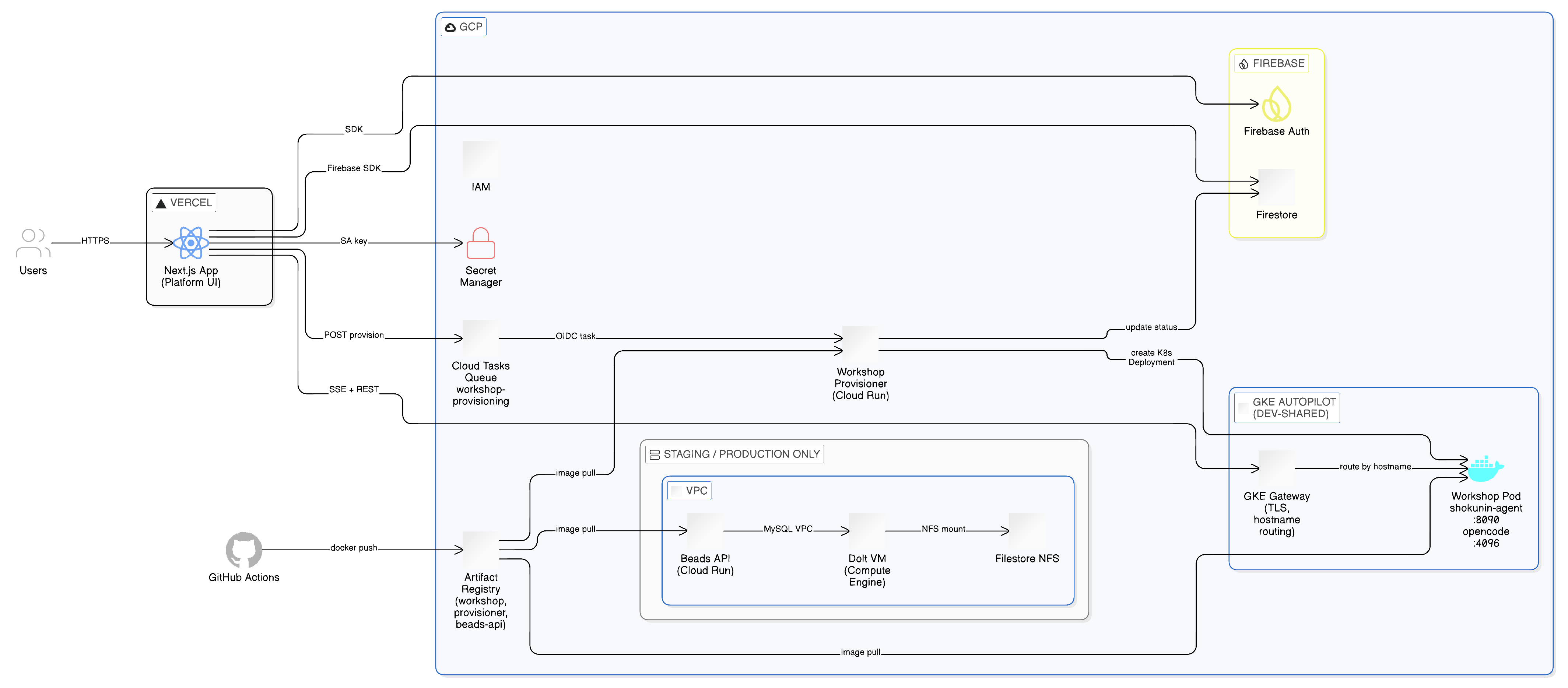
Component Overview
Vercel — Frontend Hosting
The Next.js app (v0-shokunin-ai-platform) is deployed to Vercel. Vercel provides:
- Serverless Next.js runtime (App Router, API routes)
- Global CDN for static assets
- Preview deployments for pull requests
GCP Cloud Run — Beads API
The Beads API runs on Cloud Run and bridges HTTPS requests (from Vercel and thebd CLI) to the Dolt MySQL database over the private VPC.
- Containerized; image stored in GCP Artifact Registry
- Authenticates inbound requests via
X-Beads-API-Keyheader - Egresses to the Dolt VM via the Serverless VPC Access connector
The Beads API Cloud Run service exists in the staging and production environments only. The dev-shared environment was decommissioned. Local development uses a Docker Compose
beads-api container instead.GCP Compute Engine — Dolt VM
The Dolt MySQL server runs on a GCE VM, not on Cloud Run. Dolt is a stateful MySQL-compatible database — it requires a persistent POSIX filesystem that Cloud Run cannot provide.- Machine type:
e2-micro(staging),e2-small(production) - No public IP — reachable only from within the VPC
- Startup script configures Dolt as a systemd service on first boot
The Dolt VM and Filestore exist in the staging and production environments only. Local development uses a Docker Compose
beads-backend container.GCP Filestore — Persistent Storage for Dolt
The Dolt VM mounts a Filestore NFS volume at/var/lib/dolt. This persists the database across VM reboots and re-provisions.
GCP GKE Autopilot — Workshop Containers
Workshop containers (shokunin-agent + OpenCode) run on a GKE Autopilot cluster managed in the dev-shared environment. GKE Autopilot provisions nodes automatically — no node pool configuration required. See GKE Autopilot and Workshop Container Ingress below for subdomain routing and the provisioning flow.GCP Cloud Run — Workshop Provisioner
The Shokunin Provisioner (infrastructure/shokunin-provisioner/) is a Cloud Run service that dynamically creates Workshop Deployments and Services in tenant Kubernetes namespaces.
- Triggered by
POST /api/workshops/[workshopId]/provisionvia a Cloud Tasks queue - Authenticates inbound Cloud Tasks requests via OIDC token (SA:
shokunin-{env}-provisioner-sa) - Creates a Kubernetes Deployment (shokunin-agent + OpenCode containers) and Service (ports 8090/4096) per workshop
- Updates Firestore provisioning state:
workshops/{workshopId}/provisioning/state
Firebase / Firestore — Application Data
The platform uses Firebase services for application data:
The Next.js app connects to Firestore and Firebase Auth directly via the Firebase SDK (no backend proxy).
GCP Secret Manager — Secrets
All platform secrets (API keys, database passwords, service account keys) are stored in GCP Secret Manager. Terraform is responsible for distributing them outward to Vercel, GitHub Actions, and Cloud Run — no secrets are set manually in those platforms. See Secrets & Identity Management for the full design: namespace architecture, identity map, secret flow pipeline, and developer onboarding.GCP Artifact Registry — Container Images
Docker images for all services are stored in Artifact Registry. CI/CD (GitHub Actions) pushes new images on merge; GKE and Cloud Run pull from this registry.GCP IAM — Access Control
Service accounts and IAM roles control access between GCP services. Key accounts:shokunin-dev-platform-sa— runs Terraform for all dev environmentsshokunin-dev-gha-sa— GitHub Actions CI/CD via Workload Identity Federation (no stored keys)shokunin-dev-provisioner-sa— Workshop Provisioner identity; receives Cloud Tasks OIDC tokensshokunin-dev-firebase-admin— Firebase Admin SDK; also holdsroles/run.viewer,roles/container.viewer,roles/cloudtasks.viewerfor the Infrastructure Dashboard API routeshokunin-dev-vercel-caller-sa— authenticates Vercel runtime → GCP APIs
Connectivity Summary
Terraform
All GCP resources are managed with Terraform interraform/. The infrastructure is split across reusable modules and environment-scoped root configurations.
Multi-tier environment structure
The platform uses three shared environment tiers plus per-developer sandboxes and per-tenant roots:Module structure
Resources are organised into single-purpose modules underplatform/modules/:
Wrapper scripts
Always use./terraform/scripts/tf or ./terraform/scripts/tf-tenant — they handle SA impersonation and config file wiring automatically:
terraform/README.md.
GCS infrastructure manifest
Every Terraform root writes aninfra-manifest/{key}.json file to gs://shokunin-480309-tfstate/ on every apply. This allows runtime services and the Infrastructure Dashboard to discover resource names, SA emails, and endpoints without re-reading Terraform state.
The
GcpInfraManifest TypeScript type in domains/infrastructure/types.ts defines the intended array-based schema for manifests consumed by the Infrastructure Dashboard. The Terraform manifest files currently write a flat nested structure — aligning them to the typed schema is in progress. Until then, the dashboard’s declared-resource sections fall back to live GCP API data only.GKE Autopilot and Workshop Container Ingress
Workshop containers (shokunin-agent + OpenCode) run on GKE Autopilot and are exposed externally via a shared GKE Gateway (GKE Gateway API, not Ingress).Subdomain routing
Each tenant gets two public subdomains routed through the shared Gateway:
Routing is hostname-based — no path routing. TLS terminates at the Gateway (Certificate Manager managed certificates). SSE/streaming responses are not buffered (BackendLBPolicy timeout: 3600 s,
x-accel-buffering: no).
agentUrl in Firestore
TheagentUrl field stored on the Workshop Firestore document holds the external Gateway URL — not an in-cluster DNS address. Example:
In-cluster services communicate directly via
localhost:4096 (OpenCode) and localhost:8090 (shokunin-agent) since both processes run in the same pod.Workshop provisioning flow
null → queued → running → succeeded / failed. The API returns 200 (no-op) when already queued or running, 202 when newly queued.
Terraform module topology
terraform/AGENTS.md for Terraform conventions and module structure.
Tenant Terraform
Each tenant’s Kubernetes resources are managed by a dedicated Terraform root atterraform/tenants/, applied independently per tenant.
What it provisions
- GKE namespace — Kubernetes namespace
tenant-{id}, Kubernetes Service Account (KSA), GCP Service Account (GSA) bound via Workload Identity, LimitRange, ResourceQuota - Gateway routes — Pre-creates HTTPRoute resources for
agent.{tenant}.{domain}andopencode.{tenant}.{domain}before any workshop is provisioned, so DNS and TLS certificate issuance can begin immediately - Workshop workload — Workshop Deployment and Service; injects
BEADS_DOLT_*environment variables whenbeads_dolt_hostis set in the tenant config
Applying tenant infrastructure
terraform/config/tenants/<tenant-id>.tfvars.
BEADS_DOLT_* environment variables
When a tenant config setsbeads_dolt_host, the tenant-workload module injects five environment variables into the Workshop container:
These allow the shokunin-agent and
bd CLI inside the workshop container to connect to the team’s shared Beads Dolt database.
Local vs. staging vs. production
This overview is intentionally high-level. For the full secrets and IAM design, see Secrets & Identity Management. For the live Infrastructure Dashboard, see Infrastructure Dashboard. For Terraform deployment instructions and operational runbooks, refer to
terraform/README.md.